Studio-grade AI. Zero round trips to the cloud.
Every AI tool in Vista runs directly on your machine's hardware. That means your photos are never uploaded anywhere to get the magic — and there's no waiting on a server queue.
Optimize Image
A single click reads the whole frame — skin tones, light falloff, contrast — and grades it like a colorist would. What took minutes of manual adjustment now takes a click, and you can always compare against the original before committing.
- Balances exposure, tone and color in one pass
- Built-in Compare view, side by side
- Fully reversible, non-destructive
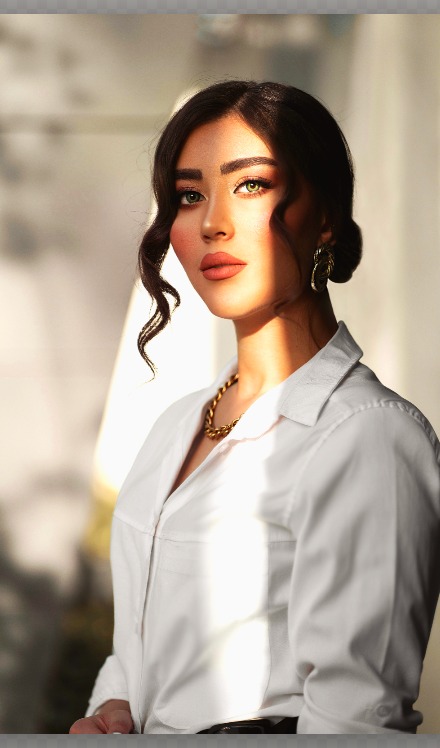
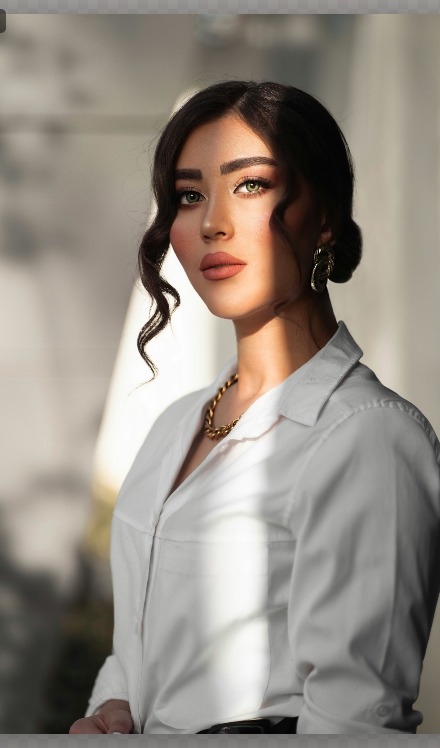 Before
After
Before
After
Remove Background, cleanly
Fine hair, soft edges, busy backdrops — Vista's on-device segmentation handles the hard cases and hands you a clean cutout, ready to drop onto a new background or export with transparency.
- One click, no manual masking
- Exports with true transparency
- Pairs with layers to composite new scenes

Click the object. Watch it disappear.
Select anything in the frame — a passerby, a stray cable, a whole second person — and Magic Eraser fills the space back in, reconstructing the background as if it was never there.
- Click-to-select, then erase
- Context-aware fill, not a blur patch
- Works on people, objects and backgrounds
Lens-quality blur, no lens required
Pick your subject and Vista keeps it razor sharp while the background falls into a smooth, natural disc-blur — the look of a fast portrait lens, rendered entirely on-device.
- Select any subject, not just faces
- Natural, adjustable blur falloff
- Great for phone photos shot at f/8
